
From Binary Code to YARA Rule: A Threatray Walkthrough with Eddiestealer
Introduction
In this tutorial, we build a YARA rule for Eddiestealer — a Rust-based info-stealer first discovered in May 2025 by Elastic Security Labs1 (Yu). Because Eddiestealer encrypts and obfuscates its strings, string-based detection is off the table. We go code-level instead, constructing a YARA rule from byte-level code patterns.
The core challenge is code selection: we need code that is both distinctive to the Eddiestealer malware family and broad enough to cover current and future variants. Generic library and runtime code tends to produce false positives, while highly variant-specific malware routines can lead to false negatives. Rust makes this especially difficult because its runtime and statically linked dependencies significantly inflate binaries with code that is hard to distinguish from the malware’s actual malicious logic.
We demonstrate how Threatray's code-similarity analysis — available in both the platform UI and the IDA Pro plugin — and its vast malware datasets cut through this noise. Starting from 1,300+ functions in a raw Eddiestealer sample, we narrow the field to a few family-specific functions in a largely automated process, before converting them into a YARA rule.
The process described in this tutorial works well for malware families where enough samples are available. Eddiestealer is a good example: as a prevalent cybercrime family, it is well-represented in Threatray's corpus. Writing YARA rules for rarer families — such as APT malware — presents different challenges, and we will cover that case in a future tutorial.
The tutorial is split into two parts. Part one outlines the rule-design process at a high level, covering the key ideas. Part two walks through every step in detail, with the actual Threatray features in action and short video clips showing the platform interaction.
Design Process for a Code-Based YARA Rule with Threatray
Threatray operates at the function level — the fundamental unit of analysis in disassemblers such as IDA Pro, Ghidra, or Binary Ninja,
The goal is to find a small number of functions that are both exclusive to the Eddiestealer family and highly representative of it — meaning present in a large number of Eddiestealer samples — then encode them into a YARA rule.
With Threatray, this is a five-step process built on a simple intuition: start broad, then narrow down. The goal is to automate as much as possible, reserving human expertise for the final stages and minimizing the amount required:
-
Step 1: We pick a small set of confirmed Eddiestealer samples to establish a reliable code baseline — enough variety across samples to see what stays consistent across malware variants and what is variant-specific.
-
Steps 2–4: We iteratively filter that baseline to isolate the handful of functions worth turning into a YARA rule, progressively funneling the search space from 1,300+ functions down to 2 strong candidates. Steps 2 and 3 are largely automated and data-driven, leveraging Threatray's code-analysis and code-statistics features. Step 4 requires expert judgment to select functions that are both distinctive and likely to persist in future variants.
-
Step 5: We translate the selected functions into an actual YARA rule and validate it against both positive and negative sample
sets to ensure good coverage without false positives.
Step 1 — Select Reference Samples
We begin by selecting a small set of confirmed Eddiestealer samples — around 10 — that we can confidently attribute to the family. We call these the reference samples.
Working from a single sample is risky: it makes it nearly impossible to distinguish code that is characteristic of the family from code that is unique to a specific variant. A small but diverse set of samples allows us to identify which functions remain stable across variants and which do not — and that distinction is at the heart of the entire process.
Threatray's malware repository and search capabilities make it straightforward to surface confirmed samples for a given family. This works well for prevalent cybercrime families like Eddiestealer; for rarer APT families, coverage may be more limited. Analysts can also bring in external samples: once ingested, Threatray's full code-analysis capabilities apply.
Step 2 — Identify Shared Functions and Apply Labels
Next, we identify functions that appear across all reference samples and are likely to be malware code. This first filtering pass produces a shortlist of candidates—promising starting points that we will validate and narrow down in the following steps.
The rationale is straightforward: functions shared across multiple samples often represent stable, family-characteristic code that persists across versions. This is a widely used heuristic in YARA rule design, whether the rule is based on strings or code.
That said, not every shared function is useful. Shared code often includes library or runtime functions, which would cause false positives and therefore must be filtered out. Our goal is to identify shared malicious functions.
Threatray supports this step with two capabilities:
- Function prevalence analysis: For a given set of malware samples, Threatray shows how frequently each function appears across the set, making it easy to identify functions shared by all samples (as well as those specific to individual variants).
- Goodware and malware labeling: Threatray matches candidate functions against a large database of known benign functions from common runtimes and libraries, as well as malware-family-specific functions. As a result, some functions are labeled as benign, while others are labeled as malicious, including family attribution. We apply this labeling mechanism to the shared functions identified in the prevalence analysis above.
If we get only goodware labels and no malware labels, then our candidate malware functions are all functions that are not labeled as goodware. On the other hand, if the analysis produces malware labels, we can directly use those as candidate malware functions for the next step.
Although labeling works very well and significantly reduces analysis time by separating benign from malicious code, occasional mislabeling can still occur. For that reason, we treat the functions identified in this step as candidates that must be further tested in Step 3.
Step 3 — Filter for Exclusivity and Representativeness
At this stage, we take the functions identified in the previous step and filter them further using simple yet powerful statistics derived from Threatray's function retro-hunting feature.
Threatray's function retro-hunt takes a single function and searches a corpus of over one billion malware and goodware functions for similar implementations — even across recompiles or minor edits. It returns a table of matching samples, labeled by malware family where attribution is available. This yields quick statistics on where a function appears.
For each function from the previous step, we run a retro-hunt and apply two criteria. A function is retained if all matches belong to the Eddiestealer family and it appears in a large number of Eddiestealer samples — indicating it is both exclusive and representative. If matches span many families, or hit mostly unknown or unlabeled samples, the function is discarded as too generic or unreliably attributable.
Step 4 — Select Final Function Candidates by Reverse Engineering
So far, Threatray has allowed us to narrow thousands of functions down to a small shortlist based on representativeness and exclusivity. At this point, those criteria have taken us as far as they can. Several remaining functions may score equally well, and selecting the final candidates requires expert judgment — specifically, reverse engineering each function to understand its semantics and assess its suitability.
The goal is to prefer functions that are likely to remain stable across future variants: core logic rather than thin wrappers, behavior that is distinctive, and code that is unlikely to be refactored away. Historically, this has been the job of a human analyst; in the near future, it will increasingly be assisted by AI.
Threatray does not currently automate this step, but AI-assisted semantic extraction is on the roadmap and will be added in a future release.
Step 5 — Write and Validate the YARA Rule
The final step is to turn the selected functions into a YARA rule: extract distinctive byte patterns and define conditions that combine them into a reliable match. This step matters because even highly characteristic functions can lead to false positives or false negatives if the patterns are too generic or too brittle.
As a best practice, test the rule on both a positive set (known Eddiestealer) and a negative set (goodware + other families). A good rule should achieve high coverage on the positive set and produce no matches on the negative set.
Threatray supports this step in part: you can build and download a positive reference set and test the YARA rule against it. For the negative set, analysts typically rely on third-party tooling or their own test corpus.
Practical walkthrough: how the process works inside the Threatray platform
In the following, we walk through the process outlined above and show how it works in practice using the Threatray platform.
Step 1 — Select Reference Samples
Threatray includes rich malware repositories that often help you find reference samples. Specifically, each Threatray instance has two repositories: a private repository that stores all samples and analyses uploaded by your organization, and a global repository curated by Threatray and updated daily with the latest malware feeds. Both repositories store samples in detonated/sandboxed form, meaning they also include unpacked, injected, and downloaded malware components recovered from process memory. As a result, you get not only the initial sample, but also subsequent components from loaders, intermediate stages, and payloads. In short, this is a rich source of binaries for building YARA rules.
In this tutorial, we’ll identify Eddiestealer samples by searching for the family/signature name, then narrowing the results to samples we track with our code-reuse signatures. Simply enter signature:EDDIESTEALER in the search dialog to return 60+ matching samples. From that list, we’ll select 10 to build our reference sample set.
Watch the video below to see how this works in the Threatray platform.
Step 2 — Identify Shared Functions and Apply Labels
In this step, we shortlist functions shared across the reference samples and apply function labeling to identify candidates for shared malicious functions.
For the rest of the demo, we work in IDA Pro with the Threatray plugin.
We download one of the Eddiestealer reference payloads from Threatray and open it in IDA Pro. The selected sample is 20eeae4222ff11e306fded294bebea7d3e5c5c2d8c5724792abf56997f30aaf9.
Function labeling. Threatray matches functions against large databases of known benign runtime/library code and labels them in IDA Pro. In this sample, we get both goodware and malware labels. Figure 1 shows examples of goodware and malware labels.
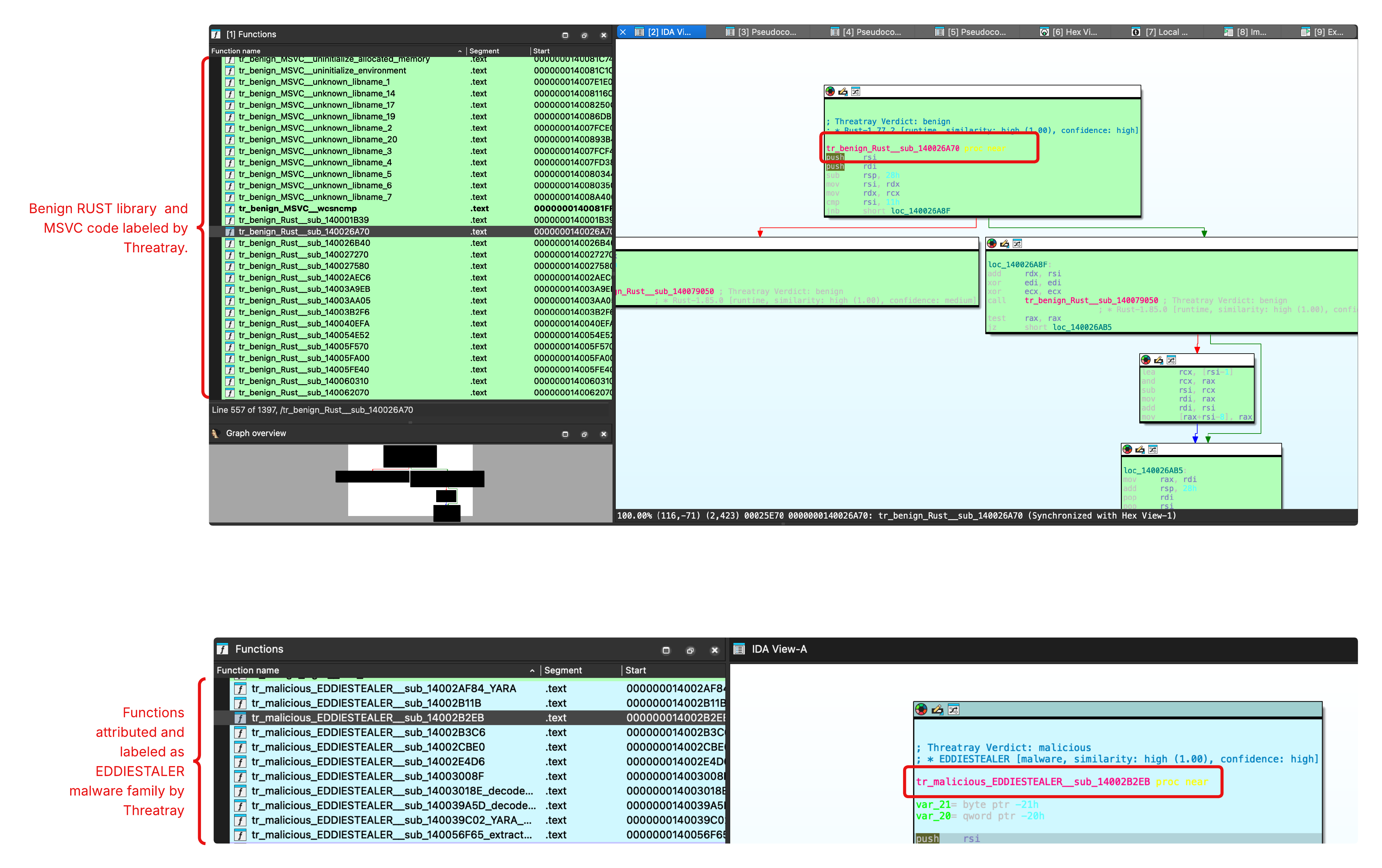
Figure 1: Threatray function attribution in IDA Pro, highlighting benign runtime/library code and Eddiestealer-attributed functions.
Shortlist functions shared across the reference set. Next, we cluster functions by prevalence across our 10 reference samples. In the resulting cluster table, the prevalence column shows how many reference samples contain each function; 10/10 means the function appears in all samples. In our IDA plugin, clustering and filtering by function labels are combined in the same dialog. Since we have malware labels in this case, we filter for shared Eddiestealer code. See Figure 2 for an illustration.
This clustering and labeling step is very powerful: it yields 11 shared Eddiestealer functions, a major reduction and time-saving step, since our sample initially contained 1,397 unknown functions.
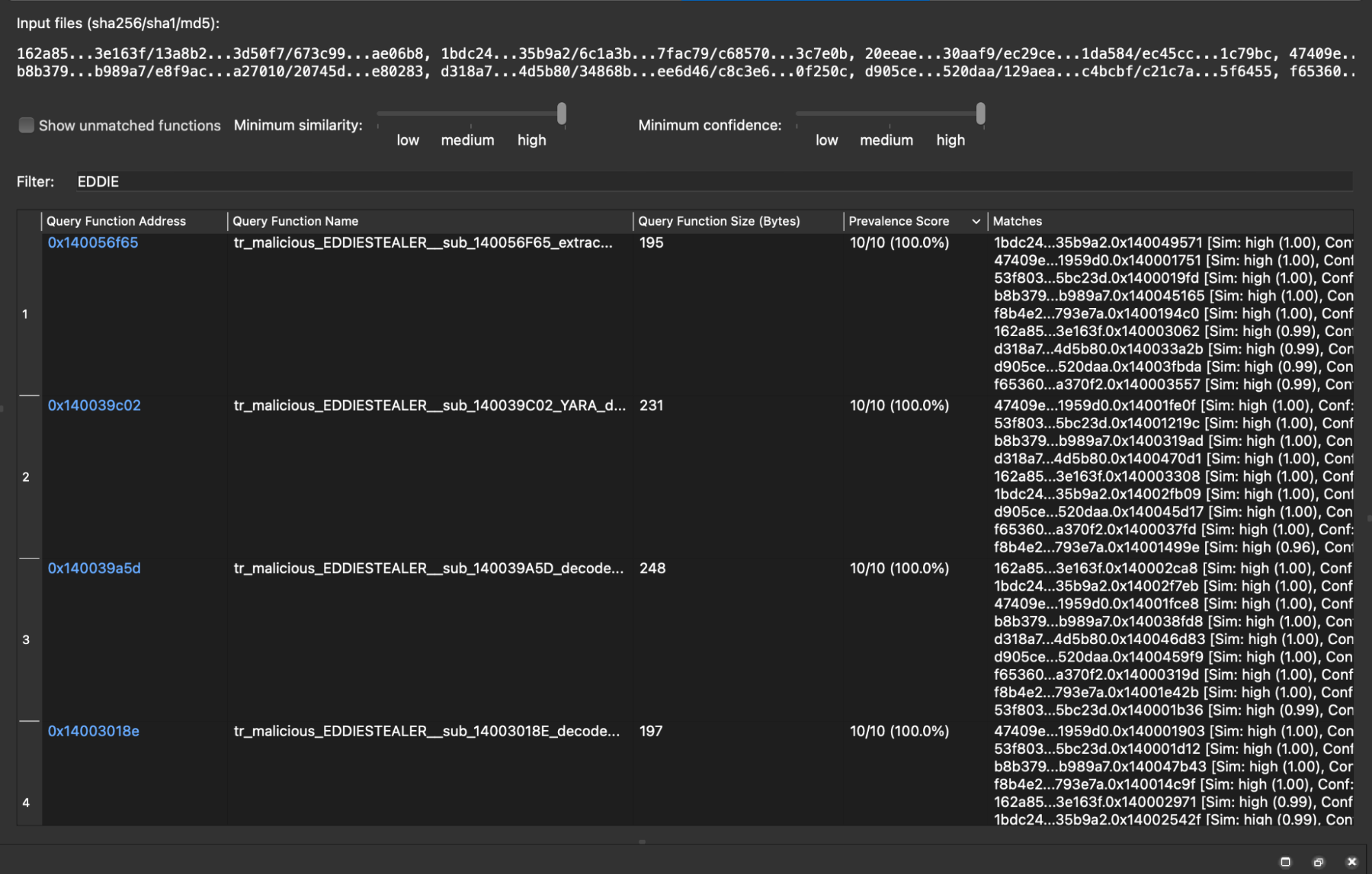
Figure 2: Shared function set filtered to display only functions attributed to the Eddiestealer family.
Check out this video on using function labeling and clustering to identify the shared function set in the Threatray platform.
Step 3 — Filter for Exclusivity and Representativeness
Next we apply function retro-hunting to assess the exclusivity and representativeness of each of the 11 functions identified in the previous step. As a side note, function-level retro-hunting is typically used by analysts as a powerful pivoting feature; here we use it differently, focusing purely on the statistical properties of the result set.
The following two examples illustrate how retro-hunting supports elimination / identification of interesting functions.
Example 1 — A function that is not exclusive to Eddiestealer. Figure 3 shows the retro-hunt results for the function tr_malicious_EDDIESTEALER__sub_14002E4D6.
Each row in the results table represents a malware sample containing that function or a closely similar one, along with its family classification. The results show matches across multiple families, including Eddiestealer, RustStealerXSS, and Malefic_C2. Because this function is not exclusive to Eddiestealer, it is eliminated and not used for our YARA rule.
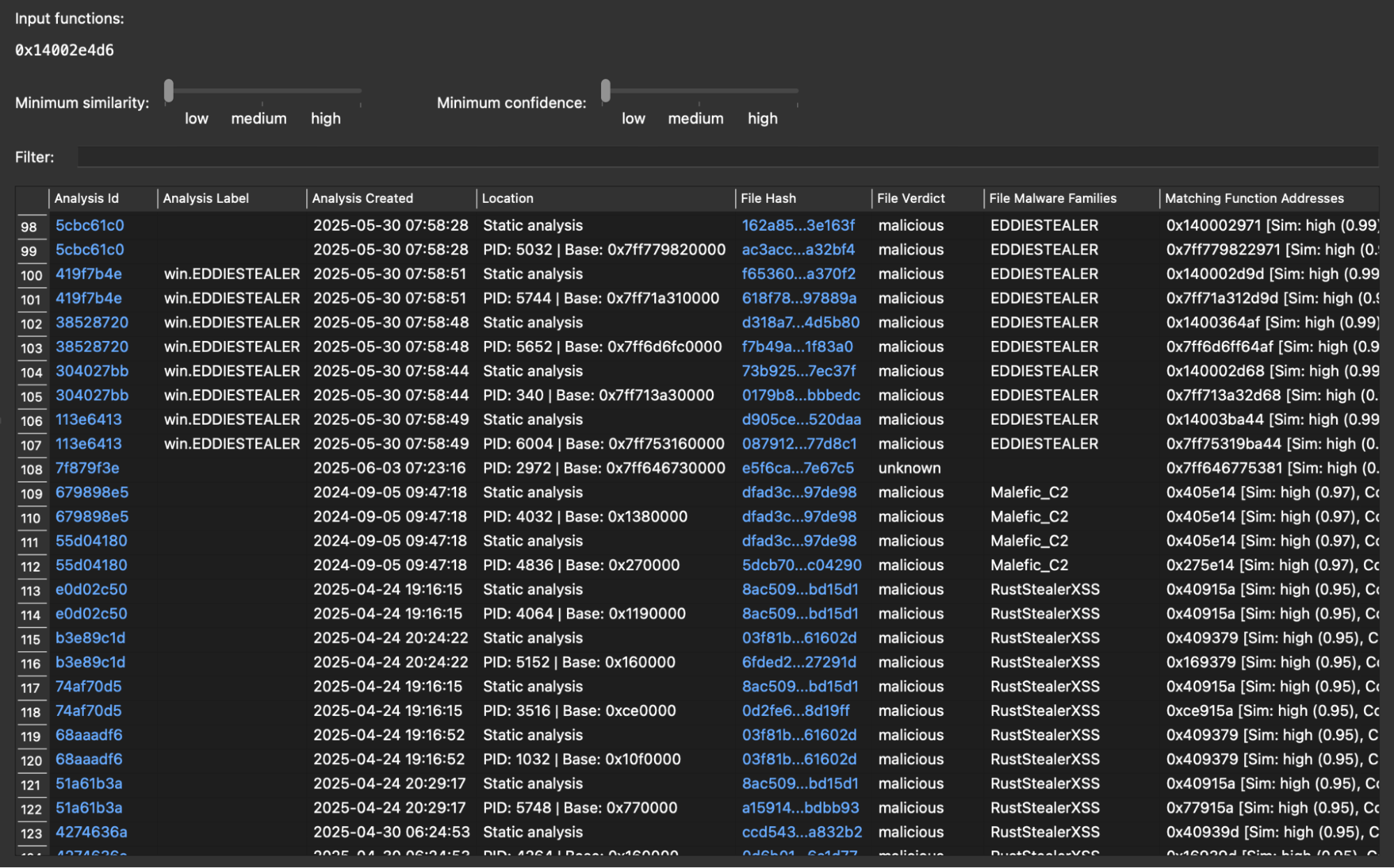
Figure 3: Retro-hunt results for tr_malicious_EDDIESTEALER__sub_14002E4D6, showing matches across multiple malware families (Eddiestealer, RustStealerXSS, Malefic_C2), disqualifying it on exclusivity grounds.
Example 2 — A function that is both exclusive and representative. Figure 4 shows the retro-hunt results for tr_malicious_EDDIESTEALER__sub_140039A5D. Threatray finds matching functions in 110+ samples, all attributed exclusively to the Eddiestealer family. Furthermore, since this function appears in far more samples than our initial 10 reference samples, it demonstrates both high confidence and broad coverage. It is therefore a strong candidate for inclusion in the signature function set.
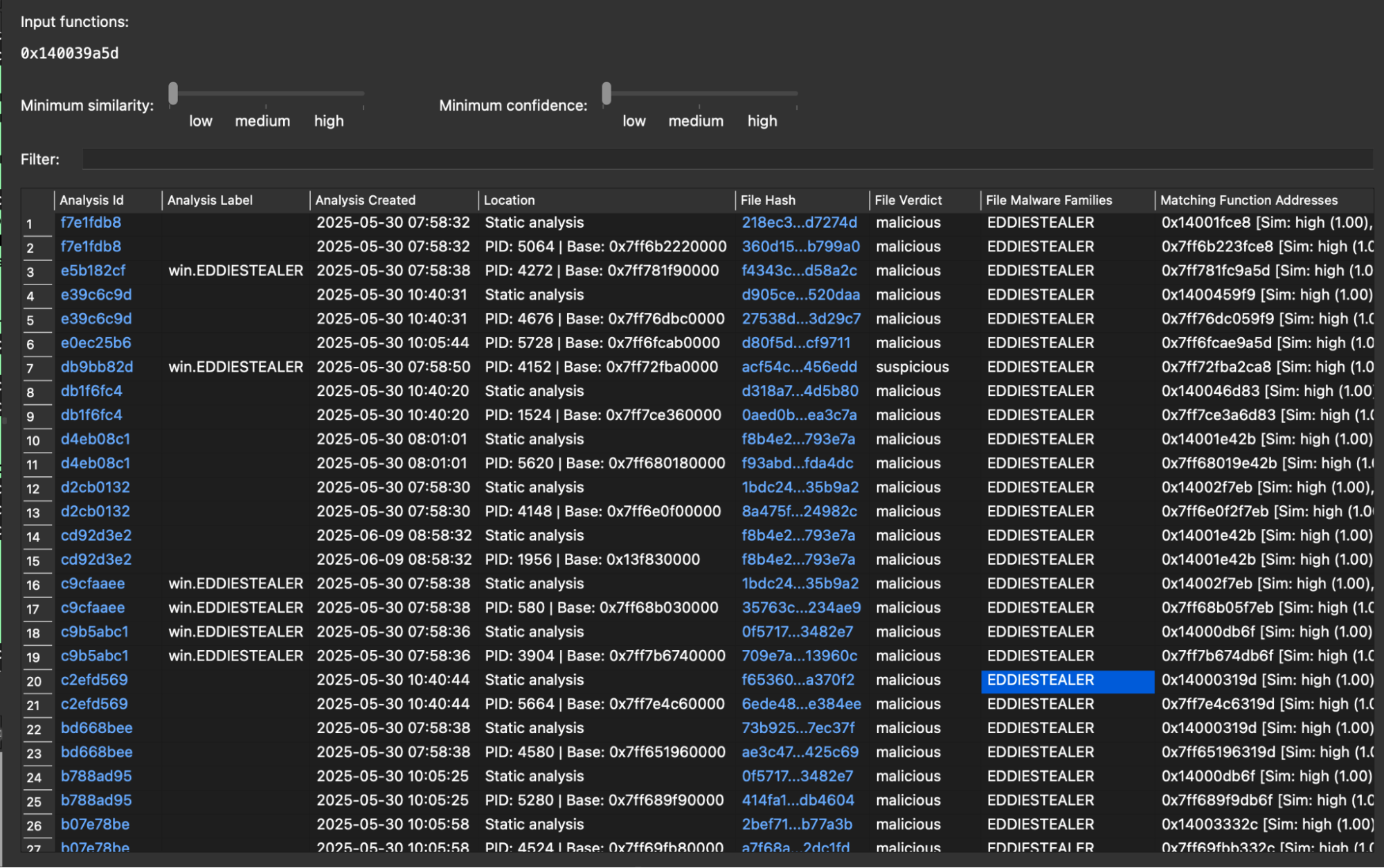
Figure 4: Retro-hunt results for tr_malicious_EDDIESTEALER__sub_140039A5D, showing 111 matches all attributed to Eddiestealer, confirming family exclusivity and strong representativeness.
Applying function retrohunting to identify exclusivity and representativeness — across all 11 labeled Eddiestealer functions, we arrive at 5 functions that satisfy both requirements, eliminating 6 functions. These are carried forward to the next step in the process: constructing the YARA rule.
Check out this video where we use malware family labels and function retro-hunting to narrow the shared-function set and isolate the most reliable candidates.
Step 4 — Select Final Function Candidates by Reverse Engineering
To select the final candidates from these five functions, reverse engineering is required: we must analyze each function to understand its semantics and assess its suitability for the YARA rule. This is the most labor-intensive step in the process, which is precisely why we have deferred it to this late stage. Thanks to Threatray's capabilities, however, we need to reverse engineer only 5 functions rather than the 1,300+ functions present in the original sample — a dramatic reduction in manual effort.
Examining these five, two functions — at 0x14002AF84 and 0x140039C02 — stand out as the strongest choices: both implement custom string decryption, appear in every Eddiestealer sample we analyzed, and are distinctive enough to minimize false positives. These two form the basis of the YARA rule in the next section.
Step 5 — Write and Validate the YARA Rule
With the two functions identified, we extracted distinctive byte patterns from their disassembly and introduced wildcards for bytes likely to vary across samples. We performed this step manually, though dedicated tools such as mkYARA2 or LLMs can streamline the process. The resulting rule is shown in Figure 5.
To validate the rule, we made use of Threatray's malware repository: we downloaded payloads for 60+ confirmed Eddiestealer samples and verified that the rule detects all of them. In parallel, a YARA rule must also be tested against goodware to ensure it produces no false positives. We did this using a retrohunt against VirusTotal's goodware collection and TLP:BLACK’s YARA quality lab feature - which both returned zero false-positive matches.
rule EDDIESTEALER {
    meta:
        author = "Threatray Research"
        description = "Hunting rule for EddieStealer"
        license = "Detection Rule License (DRL) 1.1"
        date = "2026-02-20"
        reference = "https://docs.threatray.com/docs/building-accurate-yara-rules"
        hash = "20eeae4222ff11e306fded294bebea7d3e5c5c2d8c5724792abf56997f30aaf9"

    strings:

        // 14002AF84
        $seq_01 = {
            48 83 FA 0B              // cmp     rdx, 0Bh
            77 ??                    // ja      short loc_14002B036
            44 0F B6 44 0A 02        // movzx   r8d, byte ptr [rdx+rcx+2]
            41 C1 E0 10              // shl     r8d, 10h
            44 0F B7 0C 0A           // movzx   r9d, word ptr [rdx+rcx]
            45 01 C8                 // add     r8d, r9d
            41 81 C0 ?? ?? ?? ??     // add     r8d, 80000000h
            44 33 04 10              // xor     r8d, [rax+rdx]
            44 89 44 14 28           // mov     dword ptr [rsp+rdx+48h+var_20], r8d
            48 83 C2 04              // add     rdx, 4
        }

        // 140039C02
        $seq_02 = {
            0F 57 C0                 // xorps   xmm0, xmm0
            0F 29 0?                 // movaps  xmmword ptr [rdi], xmm0
            0F 29 ?? 10              // movaps  xmmword ptr [rdi+10h], xmm0
            0F 29 ?? 20              // movaps  xmmword ptr [rdi+20h], xmm0
            0F 29 ?? 30              // movaps  xmmword ptr [rdi+30h], xmm0
            31 C9                    // xor     ecx, ecx
            48 8D 15 ?? ?? ?? ??     // lea     rdx, unk_140091797
            48 83 F9 3F              // cmp     rcx, 3Fh ; '?'
            77 ??                    // ja      short loc_140056FD9
            4C 8B 04 11              // mov     r8, [rcx+rdx]
            4C 33 04 08              // xor     r8, [rax+rcx]
            4C 89 44 0C 20           // mov     qword ptr [rsp+rcx+78h+var_58], r8
            48 83 C1 08              // add     rcx, 8
        }

    condition:
        all of them
}
Figure 5: YARA rule for Eddiestealer, derived from two characteristic functions identified from the 1,300+ functions typically present in Eddiestealer samples using Threatray's code analysis capabilities.
Acknowledgements
We would like to thank Costin Raiu (TLBLACK) and Mohamed Ashraf (Nextron) for reviewing early drafts of this document and providing valuable feedback.
Appendix
Replicating This Tutorial in Your Threatray Instance
If you have access to the Threatray platform, you can replicate every step covered in this tutorial. To do so, follow the instructions in the tutorial text and accompanying videos — what we provide below is simply a quick-reference guide to help you install the required tooling and locate the malware samples used throughout.
IDA Pro Plugin — Download and install our IDA Pro plugin from here: https://www.threatray.com/threatray-ida-plugin
Primary Sample — Download the following sample and open it in IDA Pro:
20eeae4222ff11e306fded294bebea7d3e5c5c2d8c5724792abf56997f30aaf9
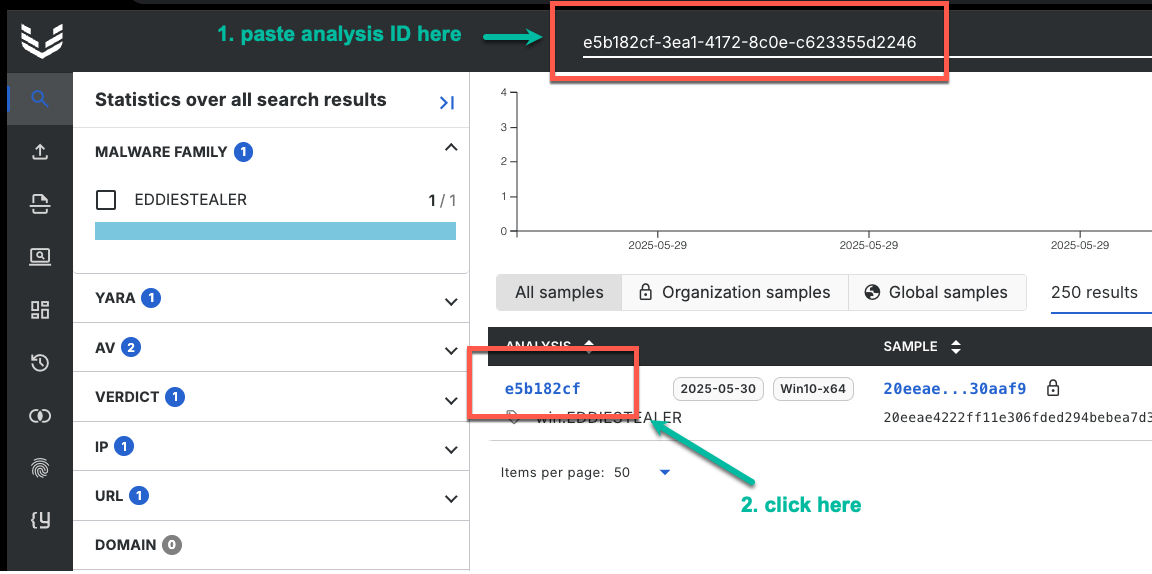
To find its analysis in Threatray, paste the analysis ID e5b182cf-3ea1-4172-8c0e-c623355d2246 into the search bar, then click on the analysis to open it:
Clustering Samples — The remaining hashes used for clustering in the IDA Pro plugin are:
1bdc2455f32d740502e001fce51dbf2494c00f4dcadd772ea551ed231c35b9a2 53f803179304e4fa957146507c9f936b38da21c2a3af4f9ea002a7f35f5bc23d 47409e09afa05fcc9c9eff2c08baca3084d923c8d82159005dbae2029e1959d0 162a8521f6156070b9a97b488ee902ac0c395714aba970a688d54305cb3e163f f8b4e2ca107c4a91e180a17a845e1d7daac388bd1bb4708c222cda0eff793e7a d905ceb30816788de5ad6fa4fe108a202182dd579075c6c95b0fb26ed5520daa b8b379ba5aff7e4ef2838517930bf20d83a1cfec5f7b284f9ee783518cb989a7 f6536045ab63849c57859bbff9e6615180055c268b89c613dfed2db1f1a370f2 d318a70d7f4158e3fe5f38f23a241787359c55d352cb4b26a4bd007fd44d5b80
Footnotes
-
Yu, Jia. “Chasing Eddies: New Rust-based InfoStealer used in CAPTCHA campaigns — Elastic Security Labs.” Elastic, 29 May 2025, https://www.elastic.co/security-labs/eddiestealer . Accessed 23 February 2026. ↩
-
“mkYARA: Generating YARA rules based on binary code.” GitHub, https://github.com/fox-it/mkYARA . Accessed 23 February 2026. ↩
Updated 8 months ago