
AI Reverser
Intro
The AI Reverser is a reverse engineer on demand. It decompiles unknown code found during an analysis and answers the questions an analyst would otherwise put to a human reverse engineer: What does this code do? What is it capable of? Is it malicious?
It works at the same two levels as the rest of Threatray's binary intelligence: the code region (a submitted file, or code extracted from process memory) and the individual functions the code contains. It provides:
- AI verdict (code regions and functions): one of Likely malicious, Suspicious, Likely benign or Inconclusive.
- AI code explanation (code regions and functions): a short summary of what the code does, for example: "This code region downloads remote payloads over HTTP and executes them in memory."
- AI capabilities (code regions only): the capabilities the code implements, such as keylogging, process injection or C2 communication. The AI Reverser checks for each capability individually and lists the ones it finds.
Together, these tell analysts what the code in front of them actually does. The AI Reverser is most valuable for binaries where no other signal is available (no family classification, no YARA hits, no open source intelligence). Without it, analysts often have little to base a decision on and have to escalate the sample to a reverse engineer, which is usually too slow and too expensive to be practical.
The AI Reverser does not run by default; a user has to request it. Each run consumes AI credits, and the number of credits depends on the number of code regions to be analyzed.
How it works
At a high level, Threatray's AI Reverser follows the same approach as other AI-assisted reverse engineering tools: the code is decompiled and split into functions, and a large language model analyzes the decompiled functions.
What sets our approach apart is Threatray's function-level intelligence. The Threatray database holds over one billion functions, many of them labeled as belonging to a malware family or as benign library code, and the AI Reverser uses both kinds of labels.
Binaries often contain large amounts of statically linked library and runtime code. Because Threatray recognizes this code, it can often exclude a large share of a binary's functions before the AI analysis starts. This makes the analysis faster, since far fewer functions remain, and more accurate: it concentrates on the code that matters, the results are not cluttered with descriptions of library code, and the excluded code cannot mislead the model into unsupported claims.
The remaining functions are not simply handed to the model one by one. The AI Reverser uses tuned prompts and optimized algorithmic strategies to decide what context the model receives for each function, so that the model has the information it needs to produce the best possible results.
Launching the AI Reverser
A single Threatray analysis can contain many code regions, so the first question is which of them the AI Reverser should analyze. This matters because analyzing more code gives a more complete result, but it also takes longer and uses more AI credits.
You can launch the AI Reverser in two places: in the analysis header, to analyze several code regions in one go, or in the binary intelligence view, to analyze one code region at a time.
Analyzing several code regions at once
Click Analyze code… next to AI Reverser in the analysis header.

A dialog appears with two options. If Threatray recommends every code region, it shows only one:
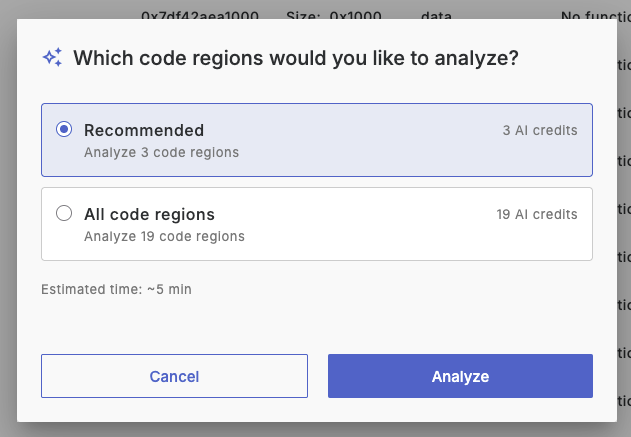
- Recommended: Threatray selects the code regions most likely to be suspicious (see below). This is faster and consumes fewer AI credits, but some code regions are left out, so relevant or even outright malicious code may be missed.
- All code regions: the AI Reverser analyzes every code region that can be analyzed. This is the most thorough option and reduces the chance of missing relevant code, but it takes longer and consumes more AI credits.
The dialog shows the number of AI credits each option consumes and an estimate of the time to completion, so you can choose the trade-off between speed, cost and completeness that suits the sample in front of you.
Threatray recommends code regions with suspicious signals, such as antivirus detections, code similarity matches to known malware, YARA findings or signs of injected code. It may also include additional regions based on heuristics.
Analyzing a single code region
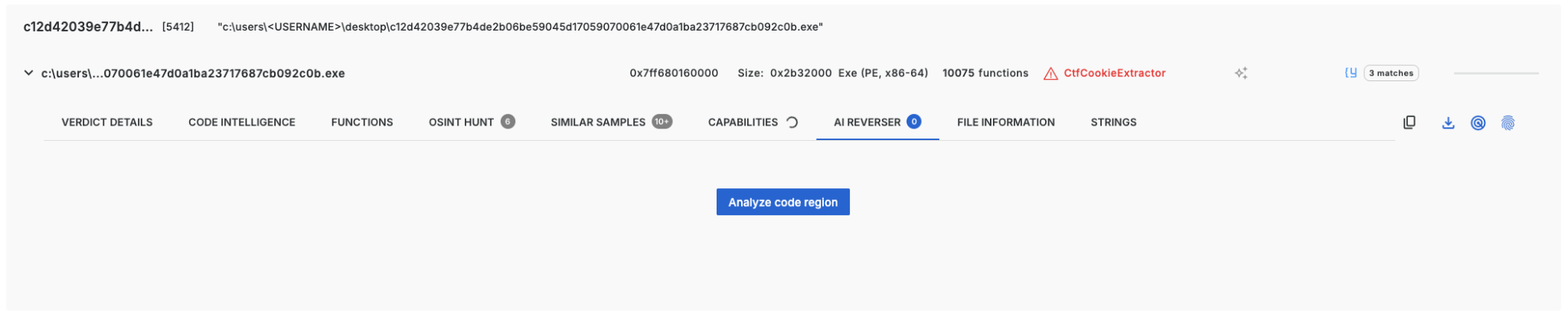
To analyze a single code region, open it in the binary intelligence view and go to its AI Reverser tab. The screenshot below shows a code region that has not been analyzed yet. To request its analysis, click Analyze code region.
Using AI Reverser results
AI Reverser results appear in two places in a Threatray analysis:
- The analysis header shows a summary of the findings next to the malware family and other verdicts, for a quick assessment of the sample.
- The binary intelligence view shows the full results for each code region and function, alongside Threatray's other core analysis capabilities.
The following sections describe each in turn.
AI Reverser results in the analysis header
The analysis header gives the information needed for a quick assessment of a sample. Its top part shows the classification and detection verdicts; the AI Reverser findings are shown in the bottom part.
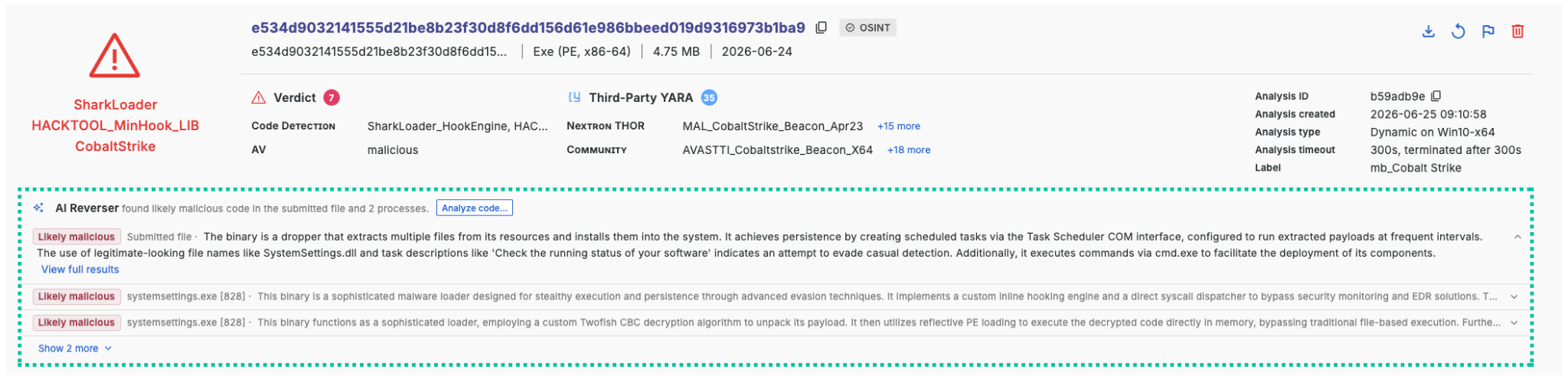
These findings summarize the results for all code regions that were analyzed. For each code region, the header shows the AI verdict and the AI code explanation. For code regions extracted from process memory, it also shows the process they were extracted from. AI capabilities, function-level results and other details are not shown in the header; you find them in the binary intelligence view.
AI Reverser results in the binary intelligence view
The binary intelligence view contains the full results of the AI Reverser. Like the rest of the view, the AI Reverser works at the level of code regions and functions: its code region results are in the AI Reverser tab, and its function results are in the Functions tab.
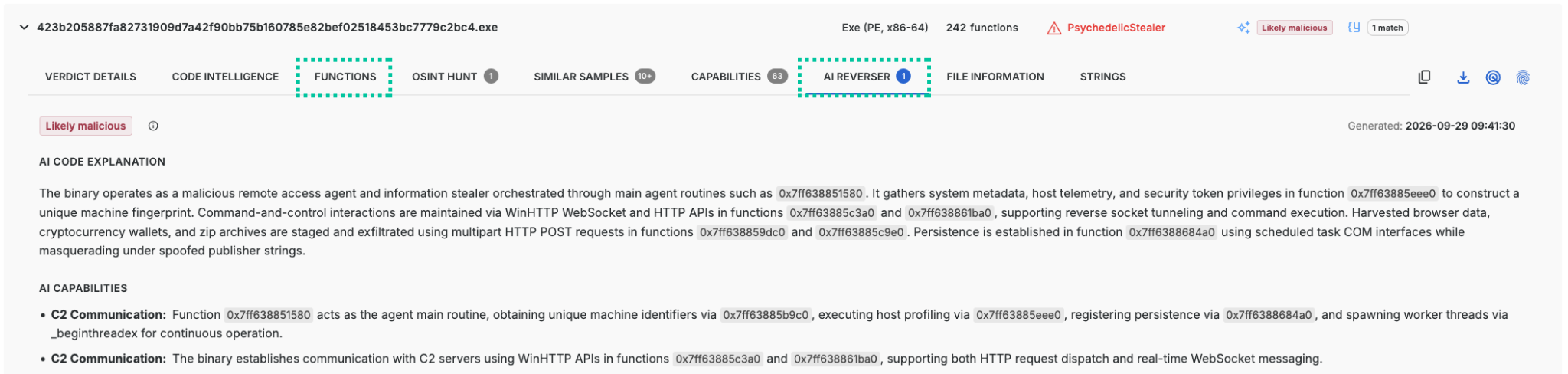
For most analysts and most use cases, the AI Reverser tab is all they need: it gives the main results for each code region at a glance. The Functions tab is for analysts who want to dig deeper and examine the code one function at a time.
AI Reverser results are only available for code regions that have been analyzed.
For a recap of the binary intelligence view, code regions and functions, see Appendix: The binary intelligence view.
Code region results
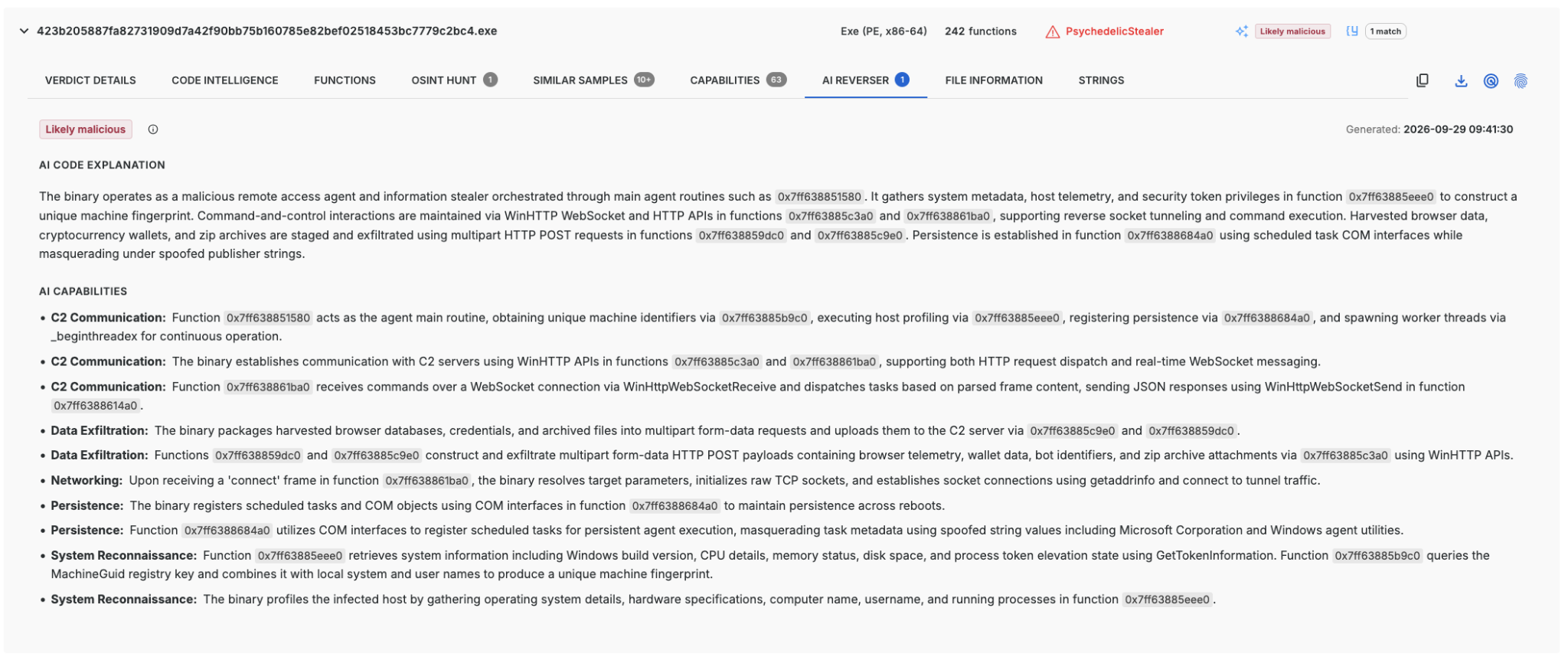
The AI Reverser tab is the starting point for reviewing AI Reverser results. For each analyzed code region, it shows the AI verdict, the AI code explanation and the AI capabilities described in the Intro. For what each verdict means, see What AI verdicts mean in the Appendix.
Verifiability is a core principle of Threatray, and the AI Reverser's results are no exception. Claims in an AI code explanation or in the AI capabilities reference the addresses of the functions they are based on, so you can check them against the underlying code. To do so, open and inspect the referenced functions' decompiled code (see Function-level results) or use the Threatray IDA Pro plugin.
The screenshot below shows the results for a code region with the verdict Likely malicious. The hexadecimal values in the AI code explanation and in each AI capability are the addresses of the functions the claim is based on.
Likely benign code regions
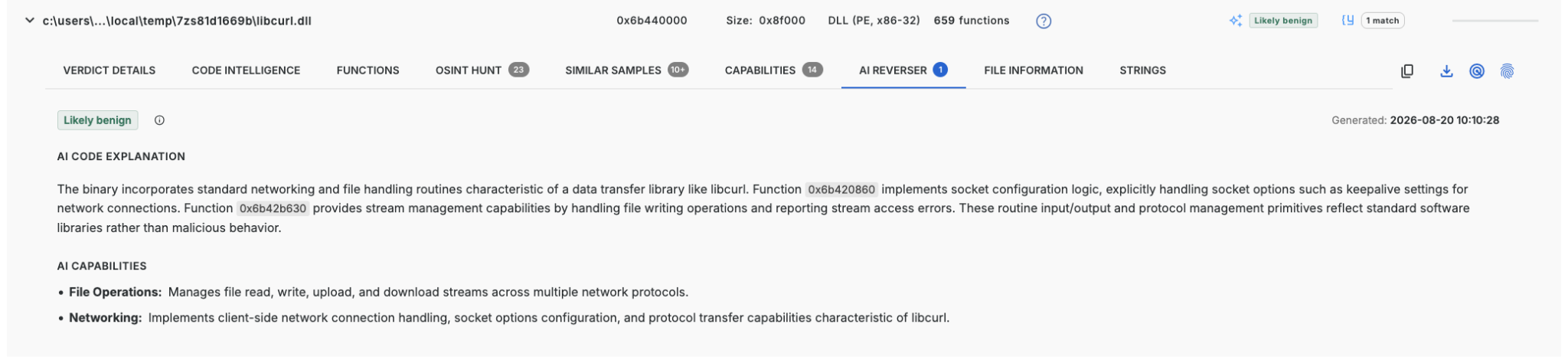
The AI Reverser can also give a code region the verdict Likely benign. Knowing which code regions are benign helps analysts decide where not to spend their time. This comes up often, for example when malware loads a custom DLL with a legitimate-looking name, or when analyzing memory dumps, which contain many library code regions.
Classic techniques such as YARA cannot show that a code region is benign. A YARA rule checks for a few bytes or byte patterns, and their presence or absence says nothing about whether the rest of the code is benign. To reach that conclusion, every function has to be examined, which is exactly what the AI Reverser does. Even with AI, however, labeling code as benign with confidence is hard. Treat these verdicts with appropriate caution; this is why they are called likely benign.
The screenshot below shows a file named libcurl.dll that was dropped into a folder the attacker could write to, a pattern often seen with backdoored libraries. The AI Reverser has analyzed all 293 functions that Threatray did not identify as known library code, and has given the code region the verdict Likely benign. This tells the analyst that the DLL is most likely an unmodified copy of libcurl rather than a backdoored one, so their time is better spent on other code regions.
Function-level results
When the code region results are not enough, for example to understand how a capability is implemented or to check a claim in detail, the Functions tab shows the AI Reverser's results for individual functions.
The tab shows a table in which each row is a function in the code region and each column shows a different type of information. The AI Reverser's results are in the AI Reverser column. For each function, the column shows:
- AI code explanation: a short summary of what the function does.
- AI verdict: the AI Reverser's verdict for the function.
Functions that Threatray identified as known library code are not analyzed, so their cell is empty.
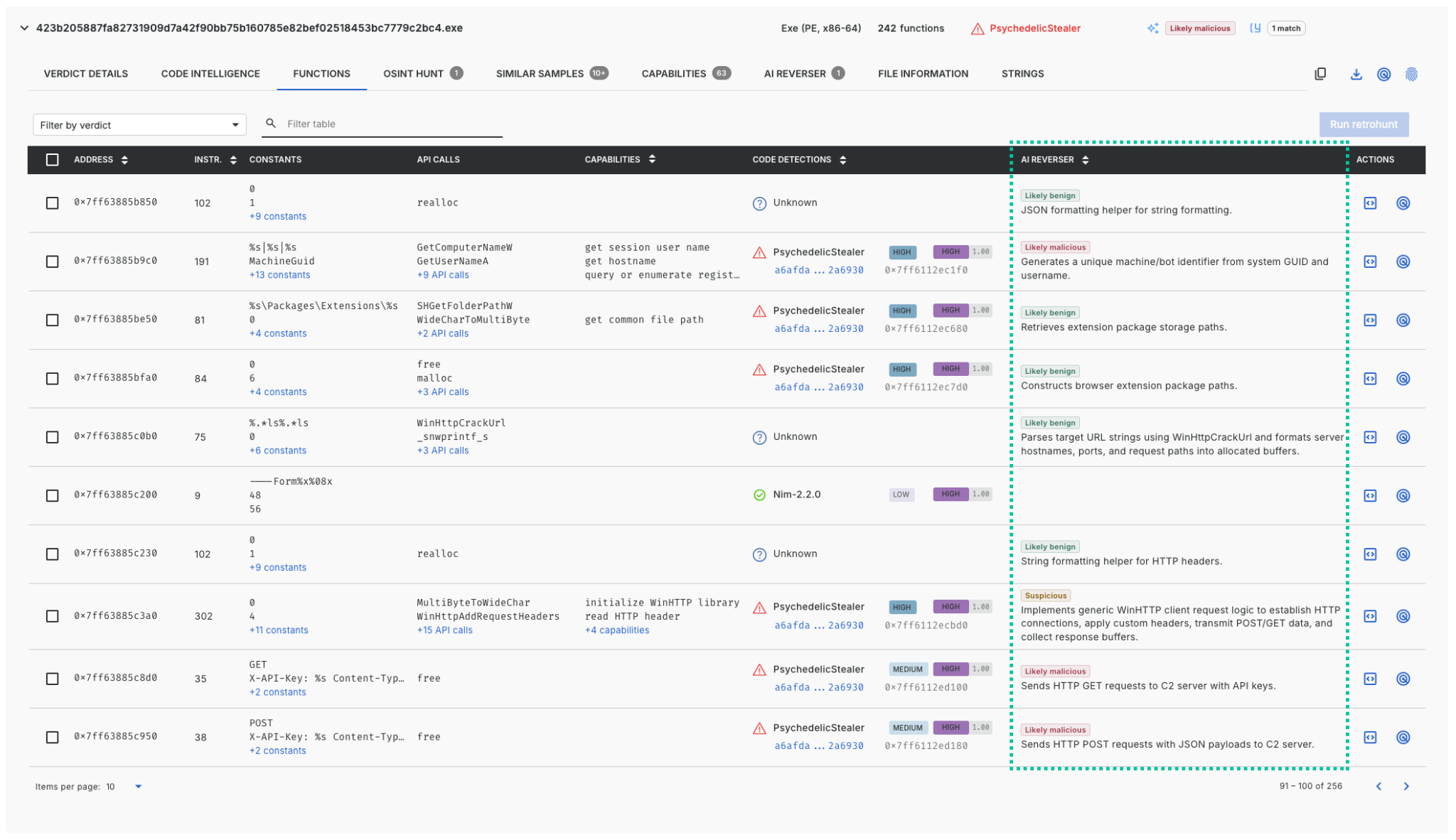
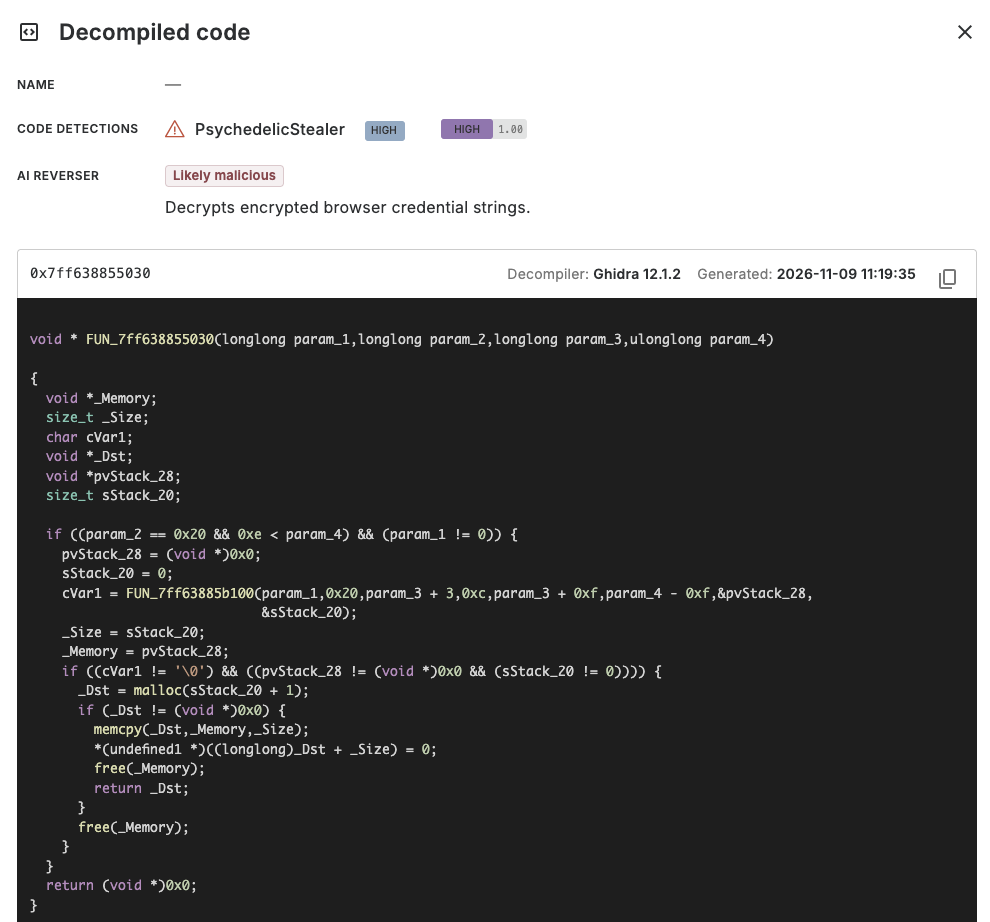
As with the code region results, every function-level result can be verified. To understand an AI verdict, or simply to look at a function's code, view the function's decompiled code. To do so, click the decompile button for the function in the Actions column:
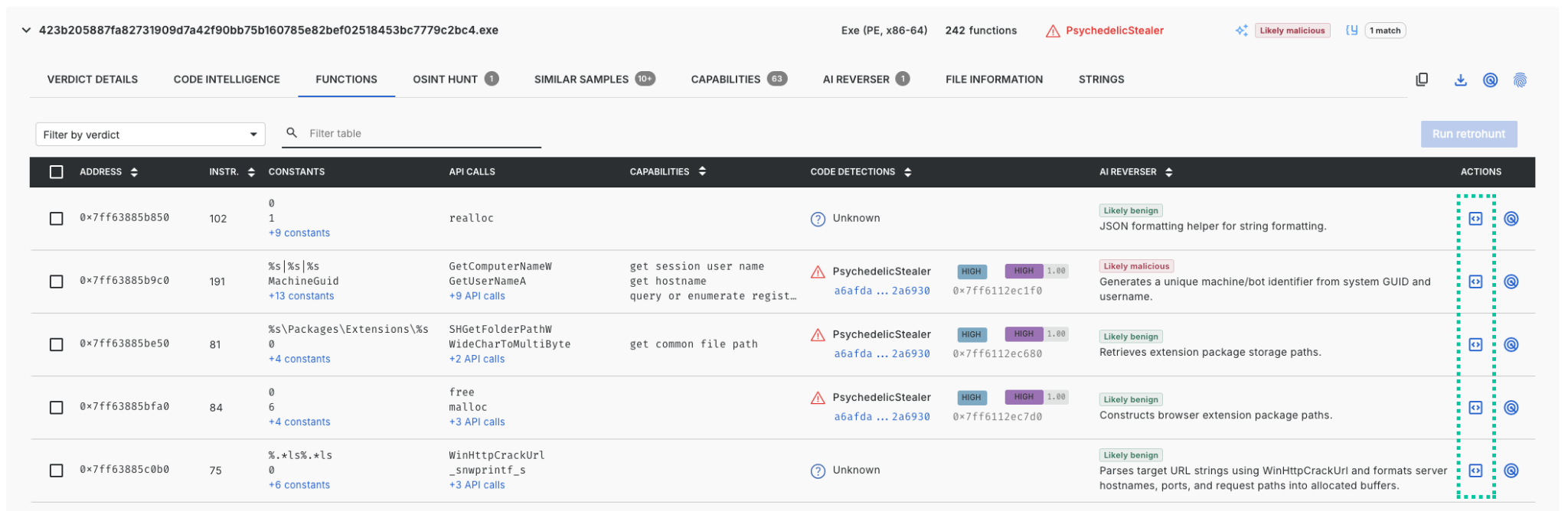
The decompiled code of the function is then displayed:
Appendix
What AI verdicts mean
| Verdict | Basis for the verdict | How to interpret it |
|---|---|---|
| Likely malicious | The AI identifies code that implements clearly harmful functionality. For example, code searches for user documents, encrypts them and demands payment to recover them. The AI reaches this verdict only when the code and its context support it. | A strong reason to investigate. Use the explanation and supporting functions to understand and verify the identified functionality. |
| Suspicious | The AI identifies functionality that gives a specific reason to suspect misuse, but a malicious purpose is not established. For example, code encrypts an embedded program before loading and executing it. | There is an identified concern worth investigating. Read the explanation to understand the behavior and what remains uncertain. Suspicious means more than simply being unable to reach a conclusion. |
| Likely benign | The AI explains all of the analyzed code as legitimate functionality and finds nothing suspicious or unexplained that contradicts this. Not finding malicious functionality is not enough on its own for this verdict. | The result can help deprioritize the examined code, but the AI can misjudge code and may miss hidden functionality. |
| Inconclusive | The available code and context do not support a clear interpretation. For example, the AI cannot establish what an important call does, or the decompilation is too incomplete to determine the code's purpose. | The result does not establish that the code is benign or that it is malicious. Use other findings or further investigation to assess it. Inconclusive is an analysis result; it does not mean the analysis failed. |
AI verdicts are qualitative judgments, and "likely" does not correspond to a fixed numerical probability. They can be wrong. They are not Threatray malware family classifications or detections, which rely on conventional, more deterministic technologies. Those can also produce false positives, but they are easier to tune to reduce them.
The binary intelligence view
The binary intelligence view is where Threatray's core analysis capabilities live. These capabilities work at the level of code regions and the functions they contain.
A code region is either a file submitted to Threatray for analysis, or code extracted from process memory, either by the Threatray sandbox during dynamic analysis or statically from a minidump or endpoint scan. During dynamic analysis, the sandbox focuses on code of unknown origin, such as injected code, unpacked code or modified modules in memory.
Some of Threatray's more advanced capabilities work at the finer level of functions: the individual functions within a code region, as a disassembler would identify them.
Updated about 13 hours ago